Google’s New AI Reports + Microsoft’s Transparency Edge: What SEOs Need to Know
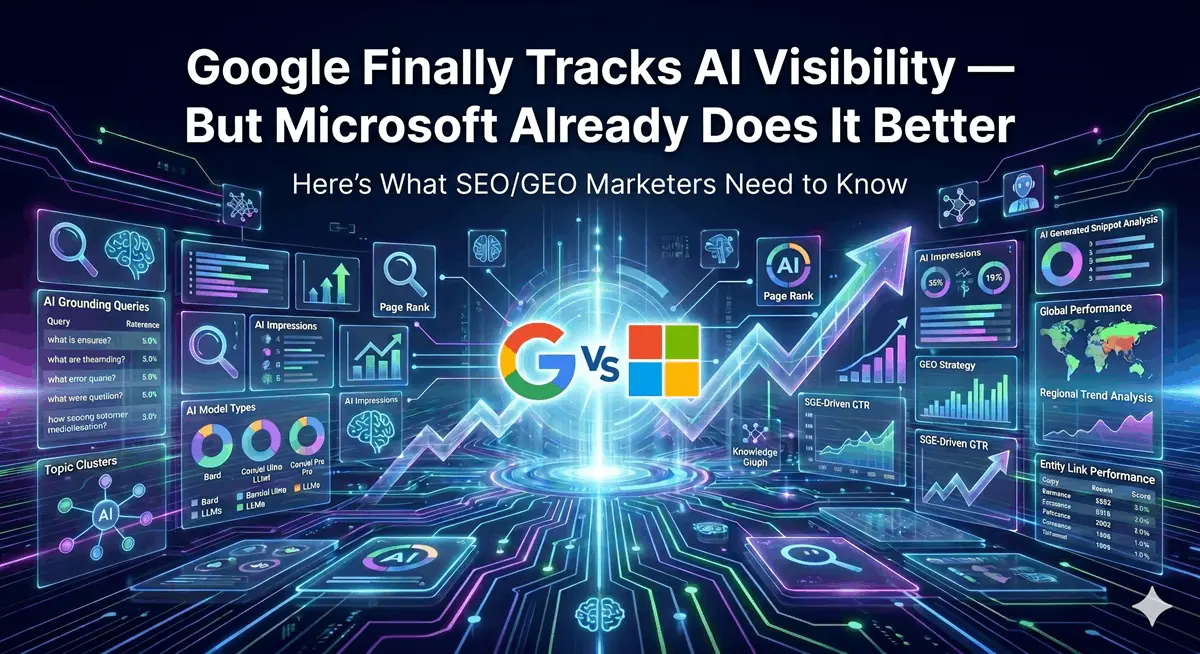
Search Console just got a long-overdue upgrade. After months of flying blind inside AI Overviews, AI Mode, and Discover’s generative features, Google has begun rolling out dedicated Generative AI Performance Reports in Search Console. It’s a genuine step forward for SEO measurement in the age of AI search, but it also comes with real gaps that every marketer needs to understand.
This post breaks down exactly what Google has released, what it means for SEO and GEO strategy, where the data falls short, and how to fill those gaps using tools both inside Google’s ecosystem and beyond it.
What Google Just Released
On June 3, 2026, Google announced two new performance reports in Search Console specifically focused on generative AI features:
- Generative AI Performance Report (Search) – covers impressions from AI Overviews and AI Mode
- Generative AI Performance Report (Discover) – covers impressions from generative AI features within Google Discover
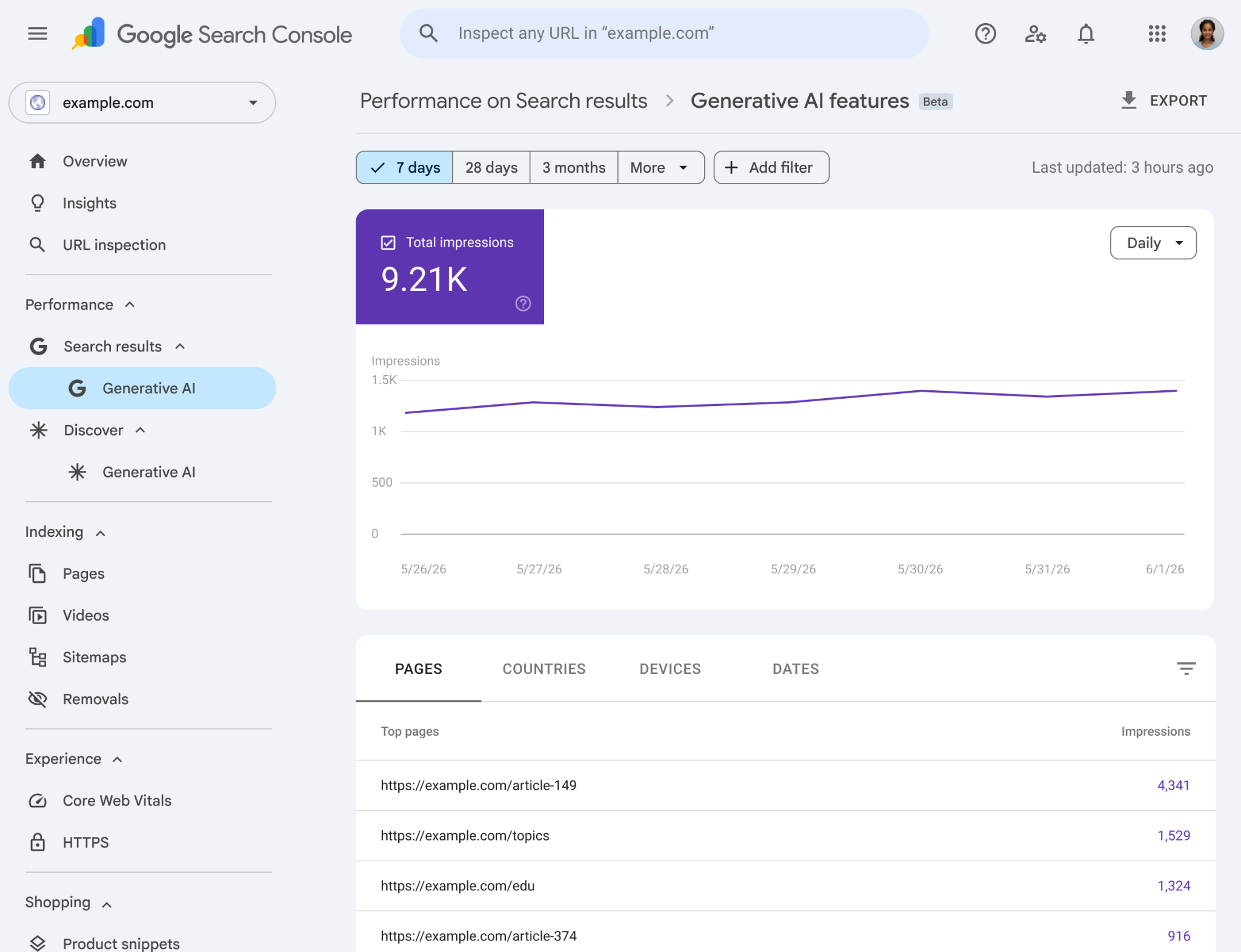
These reports are currently rolling out to a subset of website owners and will expand over time. Google is starting in the UK before a broader global rollout.
What the Reports Actually Show
For the Search report, you can access data broken down by:
- Impressions – how many times links to your site appeared inside a generative AI feature on Google Search
- Pages – which specific URLs are getting the most (or least) AI-generated visibility
- Countries – where those impressions are geographically originating
- Devices – desktop, tablet, or mobile
- Dates – daily, weekly, or monthly trends
The Discover report follows a similar structure, with impressions tracking how many times your content appeared inside a generative AI card on Discover. One important nuance: for Discover, only one impression is counted per result per session, regardless of how many times a user scrolls past and back.
Data for both reports lives inside Search Console under the Performance section, with separate direct links to access each.
Why This Is a Big Deal for SEO and GEO
The Measurement Black Box Is Starting to Open
For the past year or more, AI Overviews have been appearing for a significant percentage of queries, but website owners had almost no official way to measure their presence within them. Third-party tools offered estimates, and Search Console’s existing performance report offered nothing that distinguished a traditional organic result from a citation inside an AI-generated summary.
That disconnect created a real problem: you could see your organic clicks declining but had no official tool to understand whether your content was still being surfaced – just inside AI Overviews rather than as a traditional blue link. The new reports start to close that loop.
GEO Is Now a Measurable Discipline
Generative Engine Optimization has been a practice built largely on assumptions. You would optimise for topical authority, structured data, E-E-A-T signals, and citation worthy content, but you had no native dashboard confirming whether any of that was working inside AI surfaces.
Now you do, at least partly. A site that shows strong impression growth in the AI performance report while traditional clicks decline is getting a very clear signal: it’s being cited in AI answers, but users aren’t necessarily clicking through. That insight shapes how you think about content investment, brand visibility, and the real value of being an authoritative source in an AI-first search environment.
Discover’s AI Layer Is Suddenly Measurable
Google Discover has always been something of a mystery channel, powerful for publishers and content-heavy websites, but harder to understand than Search. The new generative AI Discover report adds another dimension: not just which content is reaching Discover users, but specifically which content is being surfaced through generative features. For publishers and content marketers, this is genuinely new intelligence.
The Significant Limitations You Need to Know
Here is where the honest conversation starts. Google’s new reports are a meaningful improvement, but they are not the full picture. Not even close.
No Click Data for Generative AI Features
This is the most significant gap. The AI performance reports show impressions only. There is no click data, no click-through rate, no way to know from these reports whether your AI Overview impressions are generating any traffic whatsoever.
This matters enormously because AI Overviews are widely associated with the zero-click problem. If your content is cited inside an AI summary that fully answers the user’s question, the user may never need to click. Impressions without clicks tells you you’re visible, but it doesn’t tell you if that visibility is generating any business value.
No Query Data
The other major missing piece is query-level data. Traditional Search Console shows you which keywords triggered impressions and clicks for your pages. The AI performance reports show no such thing. You cannot see which queries are driving your generative AI impressions.
This is a fundamental limitation for keyword strategy and GEO work. If you don’t know which topics are getting you cited in AI answers, you can’t intelligently expand or defend that coverage.
Still Rolling Out – Not Universal
Both reports are still being rolled out to a subset of Search Console users. If you don’t see them yet in your account, you’re not alone, and it doesn’t mean your content isn’t appearing in AI features.
Working Around the Gaps: How to Dig Deeper
The absence of query data from the new AI reports doesn’t mean you’re completely stuck. Here are practical approaches to get closer to the intelligence that’s missing.
Use Page-Level Data in the Standard Performance Report
The existing Search Console Performance report (web search type) still shows queries and pages for traditional results. The tactic here is to cross-reference it with what you’re seeing in the AI report.
Sort your AI performance report by pages with the highest AI impressions. Then take those specific URLs and filter them inside the standard Performance report to see which queries have been driving the most impressions and clicks historically. The theory: queries where your pages rank strongly in traditional search, and where your pages are getting AI impressions, are very likely the queries where you’re being cited in AI Overviews.
It’s not a direct attribution, but it’s a reasonable triangulation. Pages that suddenly drop in traditional impressions while gaining AI impressions are a strong signal that those keywords have shifted toward AI answer surfaces.
Use Search Type and Search Appearance Filters
Inside the standard Performance report, Google offers more granular Search appearance filtering. While not perfectly mapped to AI features, combining filters like search type (Web) with appearance types can help you spot patterns in which pages behave differently under AI-heavy query environments.
Microsoft Is Playing the Transparency Game Better
Here’s something worth saying directly: Microsoft’s approach to AI search transparency is considerably more open than Google’s. And to be precise about it, Microsoft offers two distinct products that serve different measurement purposes – it’s worth understanding what each one actually does, because they’re often conflated.
Product 1: AI Performance Report Inside Bing Webmaster Tools
Launched in public preview on February 10, 2026, the AI Performance report in Bing Webmaster Tools is the more strategically powerful of the two for GEO marketers. It tracks how your content performs inside Microsoft Copilot and Bing AI-generated answers, and it surfaces two data types that no Google tool currently offers:

Grounding Queries – these are the search phrases that Microsoft Copilot generates internally when it needs to retrieve web content to answer a user’s question. They are not the same as the user’s original prompt. When someone asks Copilot something conversational like “What should I know before refinancing my mortgage?”, Copilot translates that into structured retrieval queries such as “mortgage refinancing requirements 2026” or “when does refinancing make financial sense.” Those machine-generated phrases are the grounding queries. Your content might be cited for one of them even if you’ve never explicitly targeted the user’s original wording.
Citations – how many times Copilot actually used a specific page from your site to inform its response. Not impressions, not rankings. Actual citation events. The team at Otterly.ai tested this on their own domain over a three-month period and reported 647 unique grounding queries generating over 30,000 citation events across 173 pages – a scale of AI engagement that would have been completely invisible without this tool.
A more recent update to the report also connects the two views: you can now select a grounding query to see which of your pages it cited, or select a page to see which grounding queries drove citations to it. That bidirectional mapping is genuinely useful for content strategy.
One honest limitation worth flagging: the grounding query data is sampled, not exhaustive, and the report aggregates across Copilot and Bing AI surfaces without letting you isolate them. The data also measures citation frequency, not prominence within a response. Still, it’s more than Google offers, and Microsoft has signaled more features are coming throughout 2026.
NEW UPDATE — June 16, 2026: Bing Webmaster Tools expansion
UPDATE: Bing Webmaster Tools Adds Four New AI Visibility Features (June 16, 2026)
Just as this post was being finalized, Microsoft announced a significant expansion of the AI Performance Report inside Bing Webmaster Tools. Four new capabilities are now rolling out globally in preview: Intents, Topics, Citation Share, and Compare. Each one addresses a gap that even the original February 2026 report left open.

Intents classifies grounding queries into broader intent categories: Informational, Commercial, Navigational, Learn and Solve, Research, Creation, Local, and more. Until now, you could see which grounding queries triggered citations to your site but had no structured way to understand the context behind them. Intents changes that. An e-commerce publisher might discover their content is heavily cited in comparison-oriented interactions; a publisher in education might find strong presence in research and learning query contexts. That intent-level mapping is directly actionable for content strategy.
Topics groups related grounding queries into thematic clusters, reflecting how AI systems actually reason across concepts and themes, not isolated keywords. Queries like “solar panels,” “solar energy efficiency,” and “residential solar installation” would roll into a single Solar Energy topic cluster. For content teams that plan around editorial areas rather than individual keywords, this is a considerably more natural way to interpret AI citation data. Topics also make it easier to spot emerging areas of authority and coverage gaps you haven’t yet addressed.
Citation Share is the most strategically interesting of the four. Where the original report showed total citation counts, Citation Share shows your site’s percentage of all citations for a specific grounding query across all cited sources. It is not a competitive scoreboard, competitor domains are not exposed, but it gives you a directional read on how your presence within a topic is evolving over time. Are you capturing a growing or shrinking share of citations for the queries that matter most to you? That’s a question the original report couldn’t answer.
Compare lets you overlay two time periods on the same reporting view – current 30 days against the prior 30, or custom date ranges, making it straightforward to track how citation activity is shifting. A content update, a topic expansion, a seasonal demand cycle: Compare gives you a way to correlate those changes with citation patterns, rather than guessing at causality from a flat trend line.
One feature that was previewed at SEO Week but did not make it into this rollout is worth noting: GEO-focused recommendations covering crawlability, structured data, and indexing guidance. Microsoft has indicated this is still in development. When it arrives, it would bring Bing Webmaster Tools meaningfully closer to a full GEO audit tool, not just a reporting dashboard.
Taken together, these four additions mark a step-change in what first-party AI performance reporting can actually tell you. The original February report answered: “Where is my content being cited?” The June update starts answering: “Why is it being cited, in what context, for which themes, and how is that changing?” That progression matters and it widens the gap between Microsoft’s transparency and what Google Search Console currently offers.
What ‘Grounding Queries’ Actually Means (and Why It Changes How You Think About Keywords)
A grounding query is not the prompt a user types. It’s the AI’s internal interpretation of what it needs to retrieve in order to construct a reliable answer. The gap between those two things can be significant. A user asking a broad, conversational question might prompt the AI to generate several narrow, specific retrieval queries behind the scenes, and your content may rank for those internal queries even if it has no visible presence for the user’s original phrasing.
This means GEO content strategy isn’t just about matching user intent anymore. It’s about structuring content to answer the sub-questions an AI is likely to generate when trying to address a broader topic. The Bing AI Performance report gives you real data on which grounding queries are already driving citations to your site. That’s a content map most SEOs don’t have yet.
Product 2: AI Visibility Inside Microsoft Clarity
Microsoft Clarity is a separate free product focused primarily on user behaviour analytics – heatmaps, session recordings, engagement data. Its AI Visibility section addresses a different layer of the measurement problem: not what queries your content is being cited for, but how AI systems are physically accessing your site.
The AI Bot Activity feature is what makes this product particularly relevant for publishers and technical SEOs. Unlike client-side analytics, which AI crawlers routinely bypass entirely, Clarity’s bot activity tracking is powered by server-side logs from CDN integrations. That means it captures actual infrastructure-level traffic from AI systems – data that simply doesn’t appear in Google Analytics, traditional Search Console, or most standard reporting stacks.
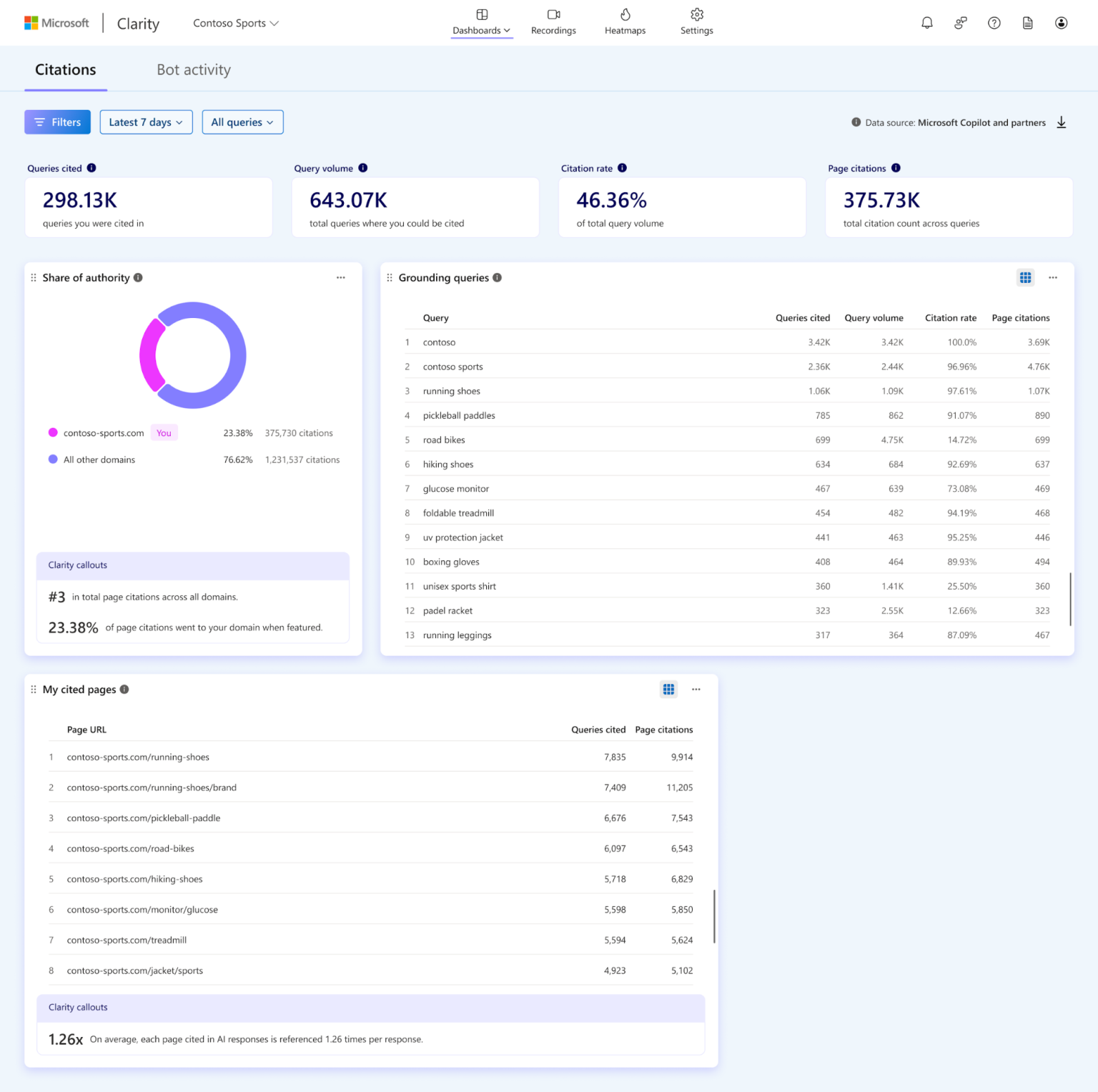
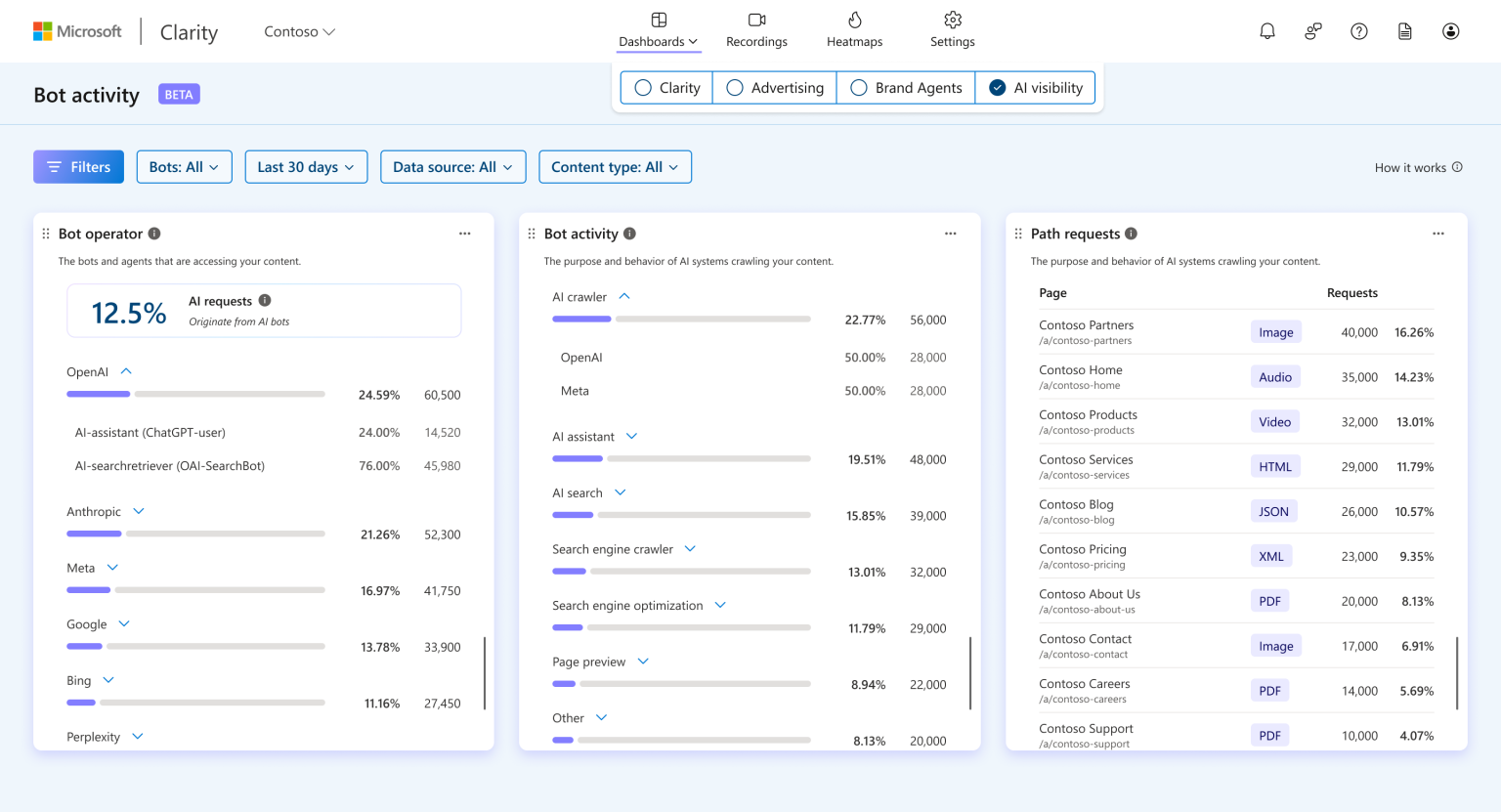
With it, you can see:
- Which AI platforms and crawlers (including GPTBot, Bingbot, ClaudeBot, and others) are accessing your content, and how frequently
- Which specific pages attract the most automated crawl attention from AI systems
- The proportion of total server requests originating from AI bots relative to human visitors
Why does crawler frequency matter? Because consistent, repeated crawling of specific pages by major AI systems is an early signal of how that content may later be cited or summarised in AI-powered responses. A page that Bingbot revisits every 48 hours is a page that Copilot considers worth staying current on. That’s intelligence worth having before it shows up (or doesn’t) in your citation data.
To be clear about the distinction: Bing Webmaster Tools AI Performance tells you how your content performs inside AI answers (citations, grounding queries – the output side). Microsoft Clarity AI Visibility tells you how AI systems are crawling and accessing your content (bot activity – the input side). Together, they give you a more complete picture than either tool provides alone and both sit on the same side of a transparency gap that Google has not yet closed.
Third-Party Tools to Explore AI Queries
One of the more creative approaches emerging in the GEO community is using query fan-out analysis to approximate what AI systems might be searching for on your behalf. Several tools have emerged to help with this:
- Wellows Query Fan-Out – lets you input a topic and see the range of sub-queries an AI might generate to answer questions about it
- Rankability AI Search Query Fan-Out – similar analysis framing for AI query expansion
- QueryFanout.io – a dedicated tool for understanding how AI systems decompose user prompts into searchable sub-queries
None of these tools are reading from live data about your site’s actual performance in AI answers. They are modelling tools. But they’re useful for content planning: if you know the spectrum of grounding queries that are likely to be generated around your core topics, you can structure your content to answer those sub-queries explicitly rather than only targeting the obvious head keywords.
What This Means for Your SEO/GEO Strategy Right Now
Let’s make this practical. Here’s how to act on the new data and work around its limits.
Check your AI impressions baseline. If you have access to the new reports, pull 90 days of data immediately and establish a baseline. Trends matter more than absolute numbers here, especially as the reports are still rolling out. Flat or growing AI impressions against declining traditional clicks is a zero-click visibility pattern, common for informational content and something you’ll want to track.
Cross-reference your top AI pages with traditional query data. Use the pages tab in the AI report to identify which URLs are getting AI surface impressions, then check those URLs in the standard Performance report to infer which query clusters are involved.
Set up both Microsoft tools if you haven’t already. Bing Webmaster Tools is free and its AI Performance report gives you citation counts and grounding queries data points Google currently offers no equivalent for. Microsoft Clarity is also free, and its AI Visibility section adds server-side bot activity tracking. Running both in parallel alongside Search Console gives you a materially more complete measurement picture.
Run query fan-out analysis on your key topics. Use the tools listed above to map the likely grounding query space around your most important content areas. Look for sub-topics your content addresses shallowly or not at all. These are GEO content gaps.
Track bot activity in your server logs. Whether through Clarity’s CDN integration or your own log analysis, monitoring which AI crawlers are hitting which pages is genuinely useful intelligence. Consistent crawling of a page by major AI systems is a signal of relevance to those systems.
The Bigger Picture: Impressions Are the New Rank
Traditional SEO was built around one core idea: rank higher, get more clicks. AI search disrupts that model at a fundamental level. A page that is cited inside an AI Overview for a high-volume query may receive zero clicks, but it has still reached the user. The brand was mentioned. The information was attributed. The authority was implicitly acknowledged.
That’s not worthless. But it requires a different measurement framework. Impressions in AI surfaces are becoming the analogue of what rank was in traditional search: a measure of visibility and authority, separate from traffic volume.
Google’s new reports are the first official infrastructure for tracking that form of visibility. They’re limited today, but they represent the direction the measurement stack is heading. Getting comfortable with the data now, understanding its constraints, and building parallel measurement approaches using Microsoft’s tools and third-party query analysis puts you ahead of the curve.
Zero-click search isn’t a problem to solve. It’s a context to optimise for. The organisations that figure out how to measure AI visibility, build content that earns it, and understand the business value of that presence even without a corresponding click will be the ones that matter in the search landscape that’s emerging right now.
Key Takeaways
- Google has launched two Generative AI Performance Reports in Search Console: one covering AI Overviews and AI Mode in Search, one covering Discover’s generative features.
- Both reports currently show impressions only – no clicks, no CTR, and no query data. This is a meaningful limitation for strategy work.
- Page-level data in the standard Performance report can be cross-referenced with AI impression data to approximate which query clusters are driving AI visibility.
- Microsoft offers two distinct free tools that together go well beyond Google’s current reporting: Bing Webmaster Tools AI Performance (citations, grounding queries – the output side) and Microsoft Clarity AI Visibility (server-side bot activity – the input side). Both are worth running alongside Search Console.
- NEW – June 16, 2026: Microsoft expanded Bing Webmaster Tools with four new AI Performance features: Intents (intent classification of grounding queries), Topics (thematic query clustering), Citation Share (your % of citations per grounding query), and Compare (time-period overlay for trend analysis). These additions put Microsoft’s first-party GEO reporting meaningfully ahead of what Google currently offers.
- Third-party query fan-out tools can help model the grounding query space around your content, supporting GEO content planning even without live data.
- AI impressions are becoming a primary visibility metric in the same way rank position was in traditional SEO. Building your measurement practice around that reality now is a strategic advantage.
For a deeper look at how Google’s AI search strategy has evolved, I covered the full arc of these changes in an earlier post: Google Search AI Evolution: Key Takeaways. That context is worth reading alongside this one.